
Mobile communication has long been centered around simple, text-based senders. For the end user, this often means uncertainty, where they are forced to trust an anonymous virtual number or an unverified text sender.
As the next generation of mobile messaging, RCS (Rich Communication Services), is being rolled out on a broad front globally, a feature is being introduced that fundamentally changes the game for how businesses and consumers meet: Verified Sender ID.
Verified Sender ID is not just an aesthetic upgrade, but a completely new infrastructure for digital trust. Instead of the customer having to guess whether an important message actually comes from their bank, logistics partner, or favorite store, this technology creates a transparent and quality-assured environment directly in the phone's built-in messaging app.
By combining advanced background validation with visual brand profiling, the focus shifts from insecure text strings to an environment where the sender's authenticity is guaranteed from the very first second. In this walkthrough, we will take a closer look at how the underlying trust model works, the technical requirements for implementation, and how digital verification creates a safer, clearer, and more engaging customer dialogue.
The trust model: A closed door to fraud
Traditional mobile text communication often suffers from anonymity, making it difficult for consumers to directly determine who is actually pulling the strings. RCS solves this through a structured trust model (Trust Model).
The model is based on the idea that a company cannot simply start sending messages under an arbitrary name – the identity must first be approved centrally. This security relies on three parties:
- The brand owner (You): Applying to become a verified sender and proving your identity.
- The verification authority (Google, Apple & the operators): Acts as doorkeepers. They review, validate, and digitally sign the profile.
- End User (Recipient): Can breathe a sigh of relief and trust that the logo and the verification symbol on the mobile actually guarantee the sender's authenticity.
This creates a fully protected channel where external actors cannot hijack or forge your brand ID.
The Process: From Application to Digital Certificate
The Process: From Application to Digital Certificate
When setting up your company profile (a so-called Brand Agent) through us, your brand undergoes a thorough and rigorous three-step validation process:
- Brand Authorization: A mandatory check is performed against an official contact person at the brand (usually via a specific and verified corporate domain) to ensure that the correct person or partner is managing the account.
- Legal audit: The brand name is matched against official corporate registries and published terms of service and privacy policies in the target market where the messages are to be sent.
- Digital signing: When everything is approved, the profile is assigned a digital certificate in the network. This allows receiving phones to automatically recognize the traffic as a verified business sender as soon as the message lands.
Logo Hosting: Technical Specifications
One of the biggest advantages of a verified ID is that your logo appears directly in the recipient's inbox and conversation thread. For this to look professional, specific settings are required:
Design and format
- File format: High-resolution PNG with a transparent background (important for the logo to look good in both Dark Mode and Light Mode).
- Dimensions: Square format, usually 224 × 224 or 512 × 512 Pixlr.
- Keep in mind: Since the icon becomes relatively small in the phone's call log, you should use a clean symbol or logo icon rather than long text strings.
Secure hosting
Since the messages are sent over the data network, the image is not embedded in the message itself. Instead, the logo is hosted on a secure, high-availability HTTPS server so that the recipient's phone can quickly and securely retrieve the image live.
How the verification is displayed in the client
When your profile is live and verified, the messaging app adapts dynamically and provides the user with a rich, app-like experience:
1. The Trust Badge
Next to your brand name, an official verification check (a shield or check icon) is displayed. This symbol is controlled directly by the operating system and cannot be forged or recreated using regular emojis.
2. Header with logo and name
Instead of an anonymous number or an unclear text string, the user is greeted by a dedicated header with your logo and your full, nicely formatted brand name at the top of the window.
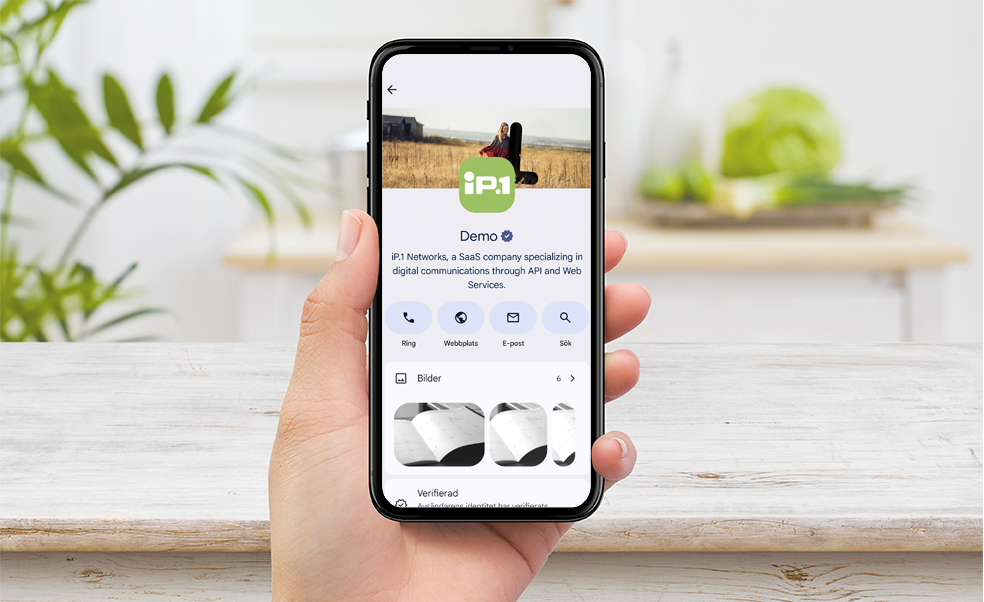
3. The Extended Organization Card
If the customer clicks on your logo, an interactive profile card opens inside the app. This acts as a mini-landing page where you can add:
- A brief description of the business.
- Quick links to call customer service or send an email.
- Direct links to your website and privacy policy.
The biggest benefits of Verified Sender ID
Increased conversion and open rate
Users are significantly more likely to open, read, and interact with messages that have a clear identity and a verification checkmark. This creates an immediate sense of security in the customer journey.
Consistent brand experience
You move your visual identity out of the website and app directly into the phone's messaging channel. The customer recognizes you immediately by color and shape.
Protection against trademark infringement
Since the verification process requires central approval, external actors cannot hijack your Verified Sender ID. This protects your brand's reputation and secures your customer communication.
Summary of the verified organization profile
| Function | Meaning |
|---|---|
| Visual presence | Logo and full name are displayed directly in the inbox. |
| Authentication stamp | A built-in verification check that guarantees the sender. |
| Interactive profile | A built-in company card with contact channels, website, and description. |
| Secure delivery | The traffic is encrypted and certified through the operator network. |