Building customer journeys with rich media, carousels, and interactive buttons in RCS delivers higher engagement than ever before. But in a reality where mobile data coverage may temporarily fail, network timeouts may occur, or the recipient’s device lacks RCS support, high demands are placed on delivery reliability. The solution is intelligent SMS fallback logic – built directly into the API infrastructure.
With a well-thought-out fallback strategy, you never have to choose between rich interactivity and 100% % coverage. If an RCS message cannot be delivered, the system seamlessly switches to SMS via exactly the same API endpoint without you having to build your own complex redundancy systems.
Why is an automated fallback logic required?
Although the rollout of RCS is progressing rapidly worldwide, there are situations where a database-based message does not reach the recipient's screen:
- Temporary lack of mobile data: The recipient is in a location with weak mobile data coverage (e.g., on a train, in a garage, or abroad without roaming). There, classic SMS signaling still reaches, but the mobile data connection is down.
- Missing RCS support on the receiver: In those cases where the recipient's device, operator or application does not yet support RCS.
- Network timeouts and operator delays: If the operator's RCS gateway does not confirm the delivery within the specified timeframe, the message must be secured via the backup channel.
By allowing the API to automatically monitor the delivery chain, it is guaranteed that business-critical messages such as one-time codes (OTP), delivery updates, or time-critical offers always reach the customer.
The five fallback policies
The fallback logic is controlled in the API via the fallbackPolicy parameter. You can select a single policy or combinations of them in a comma-separated string to customize the behavior according to the message's nature.
| Policy | Description of the project | Typical application area |
|---|---|---|
| NoFallback | No fallback is performed. If RCS fails, the delivery is aborted. | Non-critical rich messages that lack an SMS equivalent. |
| FallbackOnNoCapability | SMS is sent if the recipient does not have support for RCS. | Basic range assurance before dispatch. |
| FallbackOnFailure | SMS is sent if the RCS message is rejected or fails on the network. | Protection against technical network errors or errors by the operator. |
| FallbackAfterTimeout | SMS is sent if the delivery confirmation has not been received within a certain time. | Time-critical messages (e.g. login codes). |
| CustomerControlledFallback | The system sends callbacks so that your application can control the fallback steps externally itself. | Complex business systems with their own business rules. |
Pro tip: Combine multiple policies for maximum security, for example:
"fallbackPolicy": "FallbackOnNoCapability,FallbackOnFailure,FallbackAfterTimeout" Configuration of the fallback message (fallbackMessage)
An RCS message can contain a product carousel, high-resolution images, and interactive buttons. Since SMS is a purely text format, it is best practice to define a dedicated fallbackMessage.
If no fallbackMessage is specified, the system attempts to auto-generate text from the RCS content, but by setting an explicit text, you ensure that the message is clearly displayed even in SMS format:
- RCS (Rich Card): Picture of package + interactive ”Track delivery” button.
- SMS (fallbackMessage): ”Your package is on its way! Track your delivery here: https://dinhemsida.se/spara/12345”
For time-critical sendouts, you also activate the fallbackTimeOutSeconds, which specifies how many seconds the platform waits for the RCS delivery to be confirmed before the SMS backup is activated.
API implementation with code examples
All calls are made against the platform's base URL with authentication via Bearer Token.
Example 1: Individual recipient (POST /v3/conversations)
using System.Net.Http.Headers;
using System.Text;
using System.Text.Json;

var apiKey = "DIN_API_NYCKEL";
using var client = new HttpClient();
client.DefaultRequestHeaders.Authorization = new AuthenticationHeaderValue("Bearer", apiKey);

var payload = new
{
    brand: "mitt-varumarke",
    agent: "kundtjanst",
    recipient: "46700123456",
    fallbackPolicy: "FallbackOnNoCapability,FallbackOnFailure,FallbackAfterTimeout",
    fallbackMessage: "Hej! Din servicetid är bokad till 15 juni kl 10:00. Vill du omboka? https://dinhemsida.se/omboka/12345",
    fallbackTimeOutSeconds: 300,
    type: "Card",
    card: {
      title: "Bokningsbekräftelse",
      content: "Välkommen på service den 15 juni kl 10:00.",
      mediaUrl: "https://cdn.dinhemsida.se/bilder/service.png",
      type: "Standalone",
      order: 0,
      height: "Medium",
      orientation: "Horizontal",
      suggestions: [
        {
          text: "Omboka tid",
          type: "OpenUrlAction",
          order: 1,
          url: "https://dinhemsida.se/omboka/12345",
          postbackData: "reschedule_12345",
        }
      ]
    },
};

var json = JsonSerializer.Serialize(payload);
var content = new StringContent(json, Encoding.UTF8, "application/json");

var response = await client.PostAsync("https://api.ip1.net/v3/conversations", content);
var result = await response.Content.ReadAsStringAsync();

Console.WriteLine($"Status: {response.StatusCode}\nSvar: {result}");import asyncio
import httpx
api_key = "YOUR_API_KEY"
url = "https://api.ip1.net/v3/conversations"
payload = {
"brand": "mitt-varumarke",
"agent": "kundtjanst",
"recipient": "46700123456",
"fallbackPolicy": "FallbackOnNoCapability,FallbackOnFailure,FallbackAfterTimeout",
"fallbackMessage": "Hej! Din servicetid är bokad till 15 juni kl 10:00. Vill du omboka? https://dinhemsida.se/omboka/12345",
"fallbackTimeOutSeconds": 300,
"type": "Card",
"card": {
"title": "Bokningsbekräftelse",
"content": "Välkommen på service den 15 juni kl 10:00.",
"mediaUrl": "https://cdn.dinhemsida.se/bilder/service.png",
"type": "Standalone",
"order": 0,
"height": "Medium",
"orientation": "Horizontal",
"suggestions": [
{
"text": "Omboka tid",
"type": "OpenUrlAction",
"order": 1,
"url": "https://dinhemsida.se/omboka/12345",
"postbackData": "reschedule_12345"
}
]
}
}
async def send_message():
headers = {"Authorization": f"Bearer {api_key}"}
async with httpx.AsyncClient(headers=headers) as client:
response = await client.post(url, json=payload)
print(f"Status: {response.status_code}\nResponse: {response.text}")
asyncio.run(send_message())const apiKey = "DIN_API_NYCKEL";
const url = "https://api.ip1.net/v3/conversations";
const payload: ConversationPayload = {
brand: "mitt-varumarke",
agent: "kundtjanst",
recipient: "46700123456",
fallbackPolicy: "FallbackOnNoCapability,FallbackOnFailure,FallbackAfterTimeout",
fallbackMessage: "Hej! Din servicetid är bokad till 15 juni kl 10:00. Vill du omboka? https://dinhemsida.se/omboka/12345",
fallbackTimeOutSeconds: 300,
type: "Card",
card: {
title: "Bokningsbekräftelse",
content: "Välkommen på service den 15 juni kl 10:00.",
mediaUrl: "https://cdn.dinhemsida.se/bilder/service.png",
type: "Standalone",
order: 0,
height: "Medium",
orientation: "Horizontal",
suggestions: [
{
text: "Omboka tid",
type: "OpenUrlAction",
order: 1,
url: "https://dinhemsida.se/omboka/12345",
postbackData: "reschedule_12345",
},
],
},
};
const response = await fetch(url, {
method: "POST",
headers: {
"Authorization": `Bearer ${apiKey}`,
"Content-Type": "application/json",
},
body: JSON.stringify(payload),
});
const result = await response.text();
console.log(`Status: ${response.status}\nSvar: ${result}`);Example 2: Multiple recipients / Mass distribution (POST /v3/bundles)
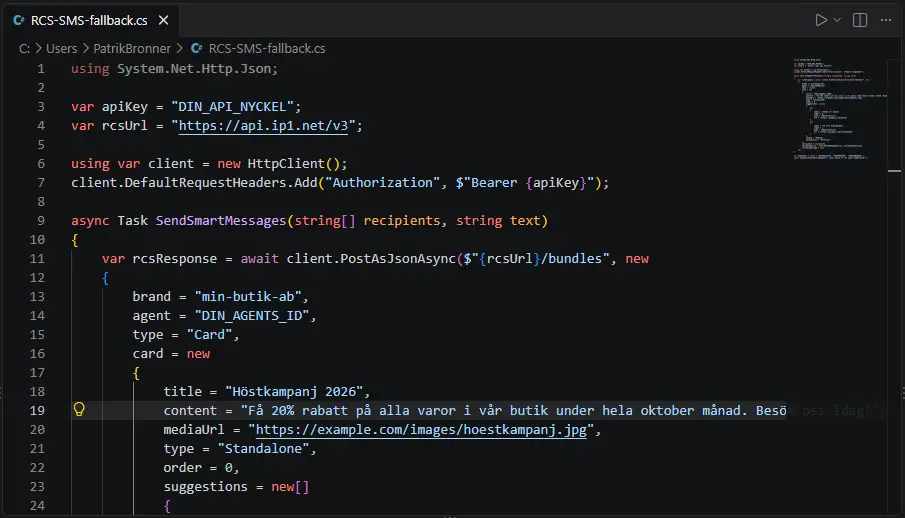
using System.Net.Http.Json;

var apiKey = "DIN_API_NYCKEL";
var rcsUrl = "https://api.ip1.net/v3";

using var client = new HttpClient();
client.DefaultRequestHeaders.Add("Authorization", $"Bearer {apiKey}");

async Task SendSmartMessages(string[] recipients, string text)
{
    var rcsResponse = await client.PostAsJsonAsync($"{rcsUrl}/bundles", new
    {
        brand = "min-butik-ab",
        agent = "DIN_AGENTS_ID",
        type = "Card",
        card = new
        {
            title = "Höstkampanj 2026",
            content = "Få 20% rabatt på alla varor i vår butik under hela oktober månad. Besök oss idag!",
            mediaUrl = "https://example.com/images/hoestkampanj.jpg",
            type = "Standalone",
            order = 0,
            suggestions = new[]
            {
                new
                {
                    label = "Besök vår butik",
                    order = 0,
                    type = "OpenUrlAction",
                    url = "https://example.com/butik"
                },
                new
                {
                    label = "Se fler erbjudanden",
                    order = 1,
                    type = "OpenUrlAction",
                    url = "https://example.com/erbjudanden"
                }
            },
            height = "Medium",
            Orientation = "Vertical"
        },
        recipients = recipients,
        fallbackPolicy = "FallbackOnNoCapability, FallbackOnFailure",
        fallbackMessage = text
    });
}

var myNumbers = new[] { "46700123456", "46700987654", "456189040623" };
await SendSmartMessages(myNumbers, "Hej! Detta är ett smart meddelande.");import requests
API_KEY = "DIN_API_NYCKEL"
RCS_URL = "https://api.ip1.net/v3"
session = requests.Session()
session.headers.update({
"Authorization": f"Bearer {API_KEY}",
"Content-Type": "application/json"
})
def send_smart_messages(recipients: list[str], text: str):
payload = {
"brand": "min-butik-ab",
"agent": "DIN_AGENTS_ID",
"type": "Card",
"card": {
"title": "Höstkampanj 2026",
"content": "Få 20% rabatt på alla varor i vår butik under hela oktober månad. Besök oss idag!",
"mediaUrl": "https://example.com/images/hoestkampanj.jpg",
"type": "Standalone",
"order": 0,
"suggestions": [
{
"label": "Besök vår butik",
"order": 0,
"type": "OpenUrlAction",
"url": "https://example.com/butik"
},
{
"label": "Se fler erbjudanden",
"order": 1,
"type": "OpenUrlAction",
"url": "https://example.com/erbjudanden"
}
],
"height": "Medium",
"Orientation": "Vertical"
},
"recipients": recipients,
"fallbackPolicy": "FallbackOnNoCapability, FallbackOnFailure",
"fallbackMessage": text
}
response = session.post(f"{RCS_URL}/bundles", json=payload)
response.raise_for_status()
return response.json()
my_numbers = ["46700123456", "46700987654", "456189040623"]
send_smart_messages(my_numbers, "Hej! Detta är ett smart meddelande.")const apiKey = "DIN_API_NYCKEL";
const rcsUrl = "https://api.ip1.net/v3";
async function sendSmartMessages(recipients: string[], text: string): Promise<unknown> {
const payload: CardMessagePayload = {
brand: "min-butik-ab",
agent: "DIN_AGENTS_ID",
type: "Card",
card: {
title: "Höstkampanj 2026",
content: "Få 20% rabatt på alla varor i vår butik under hela oktober månad. Besök oss idag!",
mediaUrl: "https://example.com/images/hoestkampanj.jpg",
type: "Standalone",
order: 0,
suggestions: [
{
label: "Besök vår butik",
order: 0,
type: "OpenUrlAction",
url: "https://example.com/butik",
},
{
label: "Se fler erbjudanden",
order: 1,
type: "OpenUrlAction",
url: "https://example.com/erbjudanden",
},
],
height: "Medium",
Orientation: "Vertical",
},
recipients,
fallbackPolicy: "FallbackOnNoCapability, FallbackOnFailure",
fallbackMessage: text,
};
const response = await fetch(`${rcsUrl}/bundles`, {
method: "POST",
headers: {
"Authorization": `Bearer ${apiKey}`,
"Content-Type": "application/json",
},
body: JSON.stringify(payload),
});
if (!response.ok) {
const errorBody = await response.text();
throw new Error(`HTTP error! status: ${response.status} - ${errorBody}`);
}
return response.json();
}
// Anrop:
const myNumbers = ["46700123456", "46700987654", "456189040623"];
await sendSmartMessages(myNumbers, "Hej! Detta är ett smart meddelande.");Monitoring and status codes for fallback
When a message is processed by the fallback engine, its status is continuously updated via the API and your registered webhooks. This provides you with full real-time traceability over which channel was actually used for delivery.
Some important status codes to know in the pipeline:
- 121 (FallbackPending): The RCS delivery could not be confirmed; the message has been prepared for SMS fallback.
- 122 (FallbackQueued): The message has been queued to be sent via the SMS gateway.
- 221 (FallbackDeliveredToHandset): The message was delivered to the recipient's phone via an alternative delivery method.
- 421 (FallbackRejected): The emergency call was rejected (e.g. due to invalid number or lack of authorization).
- 521 (FallbackFailed): The message could not be delivered either via RCS or SMS.
Best practices for maximum delivery reliability
- Customize the timeout according to the use case: For login codes and one-time passwords (OTP), the fallbackTimeOutSeconds setting should be set low (e.g., 30–60 seconds) so that the customer does not have to wait. For marketing campaigns, 300–600 seconds is appropriate to give the RCS network reasonable time to deliver.
- Always include a link in the fallbackMessage: If your RCS message contained a clickable button to a landing page, make sure that the corresponding web address is printed in plain text in your fallbackMessage.
- Measure the channel distribution: Use the status codes to analyze how large a proportion of your messages reach recipients via RCS versus SMS. This provides valuable insights into how quickly RCS reception is growing in your specific customer base.