Two-factor authentication (2FA) and one-time passwords (OTP) are cornerstones of modern digital security. Yet most companies still rely on traditional text messages, a channel increasingly plagued by ”smishing” (SMS scams), spoofed sender names, and unnecessary friction for the user.
As mobile communication is now being modernized with RCS (Rich Communication Services), authentication flows are receiving a much-needed boost. By combining cryptographically secured sender identity with interactive actions and the operating system’s built-in autofill support, you can offer an authentication experience that is both safer and faster.
End of smishing with Verified Sender ID
In traditional text flows, the alphanumeric sender name is unprotected against manipulation. Scammers can use the sender's name to match your bank or service to trick the customer.
RCS eliminates this problem by Verified Sender ID:
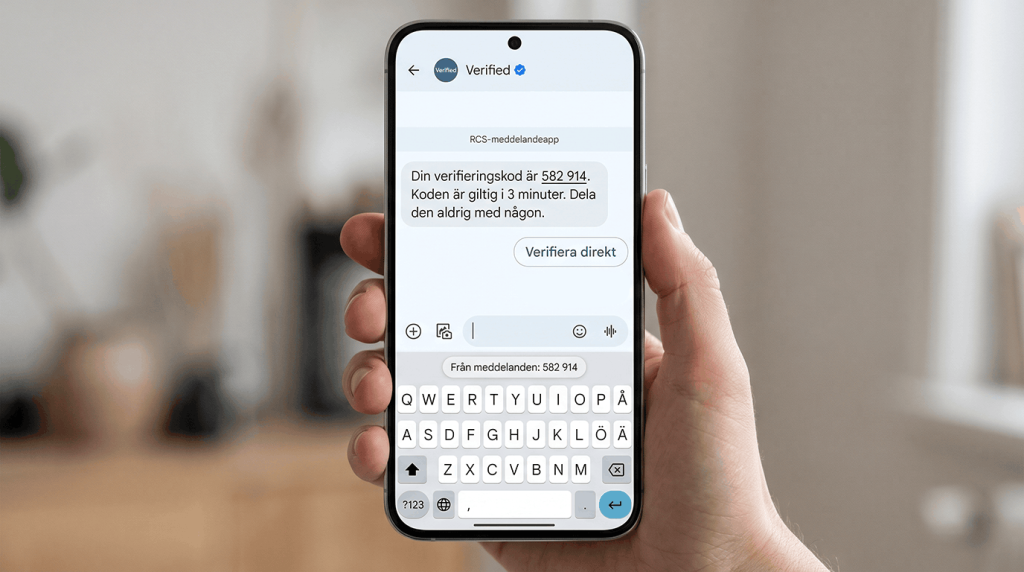
- Official brand profile: The code is delivered in a conversation marked with the company's verified name, logo, and an operating system-controlled verification badge.
- Central validation: The profile and network traffic are centrally signed and approved by the telecommunications operators and platform owners (Google and Apple). It is not possible to spoof a verified RCS sender.
- Security for the end user: The recipient never needs to doubt whether the code actually comes from the right source.
When the customer sees your logo and the verification tick, they know with 100% % certainty that the code is genuine.
How code management and copying actually work on mobile devices
To understand how we build the best possible UX for OTP via RCS, we need to distinguish between what is managed by the operating system and what is controlled by the RCS buttons.
The operating system's built-in autofill and "Copy code"
There is no specific button in the RCS standard for copying text to the clipboard. Instead, this is handled by the client and the operating system's local intelligence (in both Android and iOS):
When the message is formatted according to accepted patterns (e.g., clear separation of digits, words like ”code” or ”verification code,” or domain binding), the phone automatically recognizes the code.
The operating system then generates a ”Copy code” button itself in the notification banner or offers to paste it directly via the keyboard autofill row in the app or browser.
Next step with RCS: 1-click direct verification
Where traditional messages stop at manual code input, RCS allows Suggested Actions that takes the user one step further. By sending with a openUrlAction Can you offer a button for direct verification:
The button opens an encrypted one-time link (or an app-deep link / Universal Link) that automatically validates the session.
The customer doesn’t need to memorize, copy, or type anything – a click on the button completes the login.
Technical implementation: Code generation, payload and validation
A complete RCS OTP flow consists of three components:
Create a secure one-time code in the backend.
Send the message via the RCS API with structured text (for OS auto-fill) and a direct verification button (as well as a defined SMS fallback).
Receive and validate the code or verification token.
Step 1 & 2: Code generation and deployment (Node.js)
In the payload, we send the code clearly formatted in the message body so that the phone's operating system can offer autofill/copying. At the same time, we attach a action with openUrlAction which gives the user the option to verify with one click.
const crypto = require('crypto');

// 1. Generera en kryptografiskt säker 6-siffrig kod och en engångstoken
function generateOTP() {
    return crypto.randomInt(100000, 999999).toString();
}

const otpCode = generateOTP();
const verifyToken = crypto.randomBytes(16).toString('hex');
const userPhone = "46700123456";
const apiKey = "DIN_API_NYCKEL";

// Spara koden och token i databas/cache med kort giltighetstid (t.ex. 3 minuter)
// await redis.setEx(`otp:${userPhone}`, 180, JSON.stringify({ code: otpCode, token: verifyToken }));

// 2. Bygg RCS-payloaden
const payload = {
    brand: "Min-Tjanst",
    agent: "Sakerhet",
    recipient: userPhone,
    // Fallback: OTP är tidskritiskt – sätt en låg timeout (30-45 sekunder)
    fallbackPolicy: "FallbackOnNoCapability,FallbackOnFailure,FallbackAfterTimeout",
    fallbackMessage: `Din verifieringskod för Min-Tjanst är: ${otpCode}`,
    fallbackTimeOutSeconds: 30,
    type: "Text",
    // Tydlig formatering underlättar operativsystemets inbyggda kod-detektering
    content: `Din verifieringskod är ${otpCode}. Koden är giltig i 3 minuter. Dela den aldrig med någon.`,
    suggestions: [
        {
            text: "Verifiera direkt",
            type: "OpenUrlAction",
            url: `https://auth.mintjanst.se/verify?token=${verifyToken}`, // Djuplänk eller webblänk som validerar sessionen direkt
            postbackData: "action_verify_click",
        }
    ]
};

// 3. Skicka anropet till API:et
async function sendRcsOtp() {
    const response = await fetch("https://api.ip1.net/v3/conversations", {
        method: "POST",
        headers: {
            "Authorization": `Bearer ${apiKey}`,
            "Content-Type": "application/json"
        },
        body: JSON.stringify(payload)
    });

    console.log("OTP skickat. Status:", response.status);
}

sendRcsOtp();
Step 3: Validation in the backend
The backend system needs to be able to handle the validation in two ways: either via the manually entered/inserted code, or via the direct link.
// Examples in Express.js for manual input
app.post('/api/verify-code', async (req, res) => {
    const { phone, code } = req.body;

    // Retrieve stored session
    // const sessionData = JSON.parse(await redis.get(`otp:${phone}`));

    if (!sessionData) {
        return res.status(400).json({ error: "The code has expired or does not exist." });
    }

    if (sessionData.code === code) {
        // Consume the code immediately after validation is approved
        // await redis.del(`otp:${phone}`);
        return res.status(200).json({ success: true, message: "Verification succeeded." });
    }

    return res.status(401).json({ error: "Invalid code. Try again." });
});

// Example for 1-click direct verification via web/deep link
app.get('/verify', async (req, res) => {
    const { token } = req.query;

    // Find session based on one-time token
    // const user = await findUserByToken(token);

    if (!user) {
        return res.status(400).send("The link is invalid or has expired.");
    }

    // Approve the login and redirect the user
    return res.redirect https://mintjanst.se/dashboard?auth=success("");
});
Best practices for RCS OTP and 2FA
- Keep the fallback timeout short: While the marketing may take several minutes to deliver the RCS, a user waiting for an OTP is actively sitting in front of an login screen. Set the FallbackTimeOutSeconds to 30–45 seconds so that an SMS is quickly sent if data coverage is unavailable.
- Separate the code visually in the text: Avoid putting the numbers in long sentences without spaces. Placing the code clearly in the text helps both the phone’s auto-fill engines and makes it easier to read if the customer prefers to memorize it.
- Clear instructions on fallback: If the message falls back on SMS, the action button disappears. Therefore, ensure that the fallbackMessage contains the pure code so that the user can easily complete the process regardless of the channel.