
For decades, SMS has been a reliable, but extremely quiet, channel. You send a message and you (hopefully) receive a delivery confirmation (”Delivered”) from the operator – but afterwards it’s a ”black box”. Has the customer actually opened the message? Are they currently responding? With older SMS technology, the tools to answer this are completely lacking.
Here, RCS (Rich Communication Services) represents a massive technological leap forward. Instead of one-way communication over the aging GSM network, RCS relies on IP-based technology. Within business communication (MaaP – Messaging as a Platform), this company provides access to real-time interaction, such as reading receipts (Read) directly via asynchronous webhooks.
In this guide, we go through how to implement real-time events and why they are a key component for future customer communication.
Why read reciepts are a statistical Game Changer
When evaluating a traditional SMS campaign, ”delivered” is often the only reliable measure of reach. To measure genuine engagement, marketers and analysts have been forced to rely on click-through rates (CTR) on attached links.
With RCS, a completely new and decisive KPI for mobile communications is introduced: Open Rate (Read Rate).
By knowing exactly when and whether a message has actually been read, companies can:
Double the precision in A/B testing of messages and offers.
Identify the exact times of day when different target groups are most receptive.
Follow up on missed bill payments through other channels, which minimizes the spam feel for those who have already read the information.
This is how asynchronous Webhooks work for RCS
To deliver these events without delay, the following methods are used:
Asynchronous webhooks. Instead of your system constantly having to ask our server for new statuses (”polling”), we notify you directly. You register a URL (your webhook endpoint) with us. As soon as a user reads a message or starts typing, we immediately send an HTTP POST request (callback) with relevant data to your server.
Examples of JSON payloads
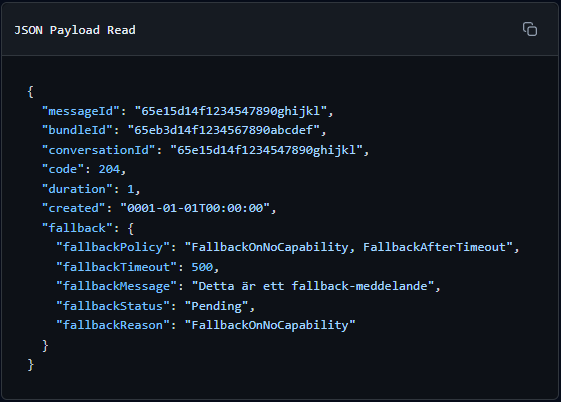
When the customer opens the message, a payload with the status READ is sent.
Payload for Read
{
  "messageId": "65e15d14f1234547890ghijkl",
  "bundleId": "65eb3d14f1234567890abcdef",
  "conversationId": "65e15d14f1234547890ghijkl",
  "code": 204,
  "duration": 1,
  "created": "0001-01-01T00:00:00",
  "fallback": {
    "fallbackPolicy": "FallbackOnNoCapability, FallbackAfterTimeout",
    "fallbackTimeout": 500,
    "fallbackMessage": "Detta är ett fallback-meddelande",
    "fallbackStatus": "Pending",
    "fallbackReason": "FallbackOnNoCapability"
  }
}
Code example: Receiving a webhook
Receiving these asynchronous events is easy. Below is an example of how a typical webhook controller can be built in C# to receive, interpret, and log these valuable KPIs.
using Microsoft.AspNetCore.Mvc;
using System;

[ApiController]
[Route("api/rcs/webhooks")]
public class RcsWebhookController : ControllerBase
{
    private readonly ILogger _logger;

    public RcsWebhookController(ILogger logger)
    {
        _logger = logger;
    }

    [HttpPost("events")]
    public ActionResult ReceiveReadCallback([FromBody] RcsReadCallbackPayload payload)
    {
        // Check if the status code corresponds to Read (Code 204)
        if (payload.Code == 204)
        {
            _logger.LogInformation("The message in {MessageId} the conversation {ConversationId} has been marked as READ.",
                payload.MessageId, payload.ConversationId);

            // TODO: Update message status and read statistics (KPI) in your database
        }

        // IMPORTANT: Always return HTTP 200 OK quickly to avoid retries
        return Ok();
    }
}

// DTO classes adapted for the RCS API's read-only payload
public class RcsReadCallbackPayload
{
    public string MessageId { get; set; }
    public string BundleId { get; set; }
    public string ConversationId { get; set; }
    public int Code { get; set }
    public int Duration { get; set; }
    public DateTime Created { get; set; }
    public FallbackDetails Fallback {get; set;}
}

public class FallbackDetails
{
    public string FallbackPolicy { get; set; }
    public int FallbackTimeout { get; set;}
    public string FallbackMessage { get; set;}
    public string FallbackStatus { get; set; }
    public string FallbackReason { get; set; }
}
3 Best Practices for Managing Webhooks
Respond quickly (HTTP 200 OK)Your endpoint should return an ”OK” immediately. Avoid making heavy database calls synchronous during the same request. If a database update takes too long, our system may think the delivery failed and try to send the webhook again. Instead, put heavy tasks in a background job.
Imempotent managementNetworks are unpredictable, and sometimes the same event can be triggered twice. Use the unique eventId that is sent in the payload to ensure that you do not log the same alert more than once.
Build bridges between IT and MarketingDon't let this data stay in the server logs. Make sure that the Read Rates are fed directly into your CRM systems or marketing dashboards, so that your business can truly capitalize on the increased insights.
Summary
With the introduction of Real-time Events, RCS removes the old uncertainty about what happens after the communication leaves the server. Knowing whether a customer has indeed read an offer, or seeing in real time when they formulate a question to customer service, moves the entire B2C dialogue from static emails to genuine conversations.
With a properly integrated Read webhook, you not only gain control over your data; you also ensure that you maximize the potential of next-generation mobile communication.