
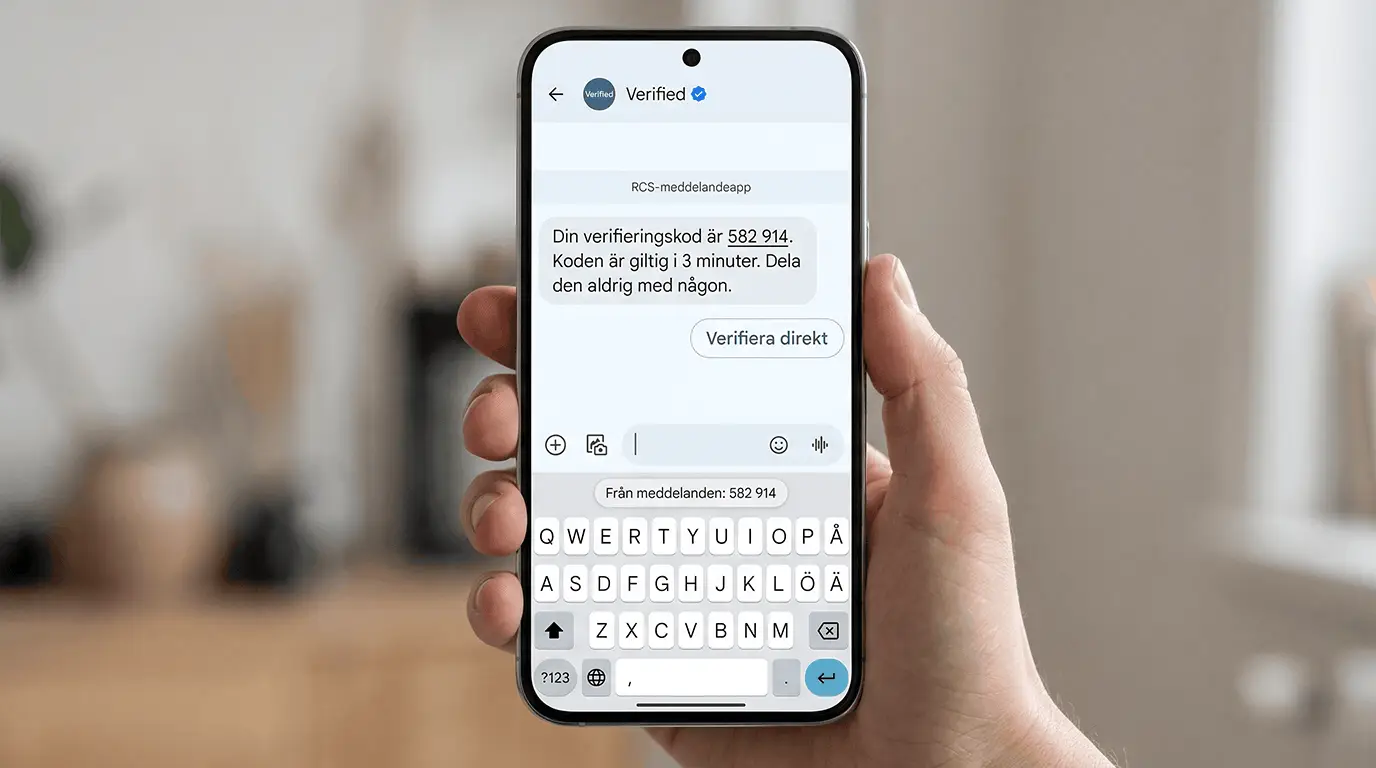
Two-factor authentication (2FA) and one-time passwords (OTPs) are cornerstones of modern digital security. Yet most businesses still rely on traditional text messages, a channel increasingly affected by smishing, spoofed sender names, and unnecessary user friction.
As mobile communications evolve with RCS (Rich Communication Services), authentication flows receive a much-needed upgrade. By combining cryptographically secured sender identity with interactive actions and built-in operating-system autofill support, you can provide a sign-in experience that is both safer and faster.
Stop smishing with Verified Sender ID
In traditional text-message flows, alphanumeric sender names are not protected against manipulation. Fraudsters can use the same sender name as your bank or service to deceive customers.
RCS eliminates this problem with Verified Sender ID:
- Official brand profile: The code is delivered in a conversation labeled with the company's verified name, logo, and an operating-system-controlled verification badge.
- Central validation: The profile and network traffic are signed and centrally approved by carriers and platform providers (Google and Apple). A verified RCS sender cannot be spoofed.
- End-user confidence: Recipients never need to question whether the code came from the correct source.
When customers see your logo and verification badge, they know with certainty that the code is genuine.
How code handling and copying work on mobile devices
To build the best possible OTP experience with RCS, distinguish between behavior provided by the operating system and behavior controlled by RCS buttons.
Built-in OS autofill and "Copy code"
The RCS standard does not define a dedicated button for copying text to the clipboard. Instead, this is handled by local intelligence in the client and operating system on both Android and iOS:
When a message follows established patterns—such as clearly separated digits, words like “code” or “verification code,” or domain binding—the phone automatically detects the code.
The operating system then generates a “Copy code” button in the notification banner or offers to paste the code directly from the keyboard's autofill row in the app or browser.
The next step with RCS: one-click verification
Traditional messages stop at manual code entry, while RCS Suggested Actions can take users one step further. By including an openUrlAction, you can offer a direct-verification button:
The button opens an encrypted single-use link, app deep link, or Universal Link that automatically validates the session.
The customer does not need to memorize, copy, or enter anything—one click completes the sign-in.
Technical implementation: Code generation, payload, and validation
A complete RCS OTP flow consists of three components:
Generate a secure one-time code in the backend.
Send the message through the RCS API with structured text for OS autofill, a direct-verification button, and a defined SMS fallback.
Receive and validate the code or verification token.
Steps 1 and 2: Code generation and delivery
The payload places the clearly formatted code in the message body so that the phone's operating system can offer autofill or copying. It also includes an action with an openUrlAction, giving users the option to verify with one click.
using System;
using System.Net.Http;
using System.Net.Http.Headers;
using System.Security.Cryptography;
using System.Text;
using System.Text.Json;
using System.Threading.Tasks;

class Program
{
    // 1. Generate a cryptographically secure six-digit code and single-use token
    static string GenerateOtp()
    {
        return RandomNumberGenerator.GetInt32(100000, 1000000).ToString();
    }

    static async Task Main()
    {
        string otpCode = GenerateOtp();
        string verifyToken = Convert.ToHexString(RandomNumberGenerator.GetBytes(16)).ToLowerInvariant();
        string userPhone = "46700123456";
        string apiKey = "YOUR_API_KEY";

        // Store the code and token in a database/cache with a short lifetime (for example, 3 minutes)
        // await redis.StringSetAsync($"otp:{userPhone}", JsonSerializer.Serialize(new { code = otpCode, token = verifyToken }), TimeSpan.FromMinutes(3));

        // 2. Build the RCS payload
        var payload = new
        {
            brand = "My-Service",
            agent = "Security",
            recipient = userPhone,
            fallbackPolicy = "FallbackOnNoCapability,FallbackOnFailure,FallbackAfterTimeout",
            fallbackMessage = $"Your verification code for My-Service is: {otpCode}",
            fallbackTimeOutSeconds = 30,
            type = "Text",
            content = $"Your verification code is {otpCode}. The code is valid for 3 minutes. Never share it with anyone.",
            suggestions = new[]
            {
                new
                {
                    text = "Verify now",
                    type = "OpenUrlAction",
                    url = $"https://auth.mintjanst.se/verify?token={verifyToken}",
                    postbackData = "action_verify_click"
                }
            }
        };

        // 3. Send the request to the API
        using var httpClient = new HttpClient();
        httpClient.DefaultRequestHeaders.Authorization = new AuthenticationHeaderValue("Bearer", apiKey);

        string jsonContent = JsonSerializer.Serialize(payload);
        using var httpContent = new StringContent(jsonContent, Encoding.UTF8, "application/json");

        HttpResponseMessage response = await httpClient.PostAsync("https://api.ip1.net/v3/conversations", httpContent);
        Console.WriteLine($"OTP sent. Status: {(int)response.StatusCode}");
    }
}
import secrets
import requests
# 1. Generate a cryptographically secure six-digit code and single-use token
def generate_otp() -> str:
return str(secrets.randbelow(900000) + 100000)
otp_code = generate_otp()
verify_token = secrets.token_hex(16)
user_phone = "46700123456"
api_key = "YOUR_API_KEY"
# Store the code and token in a database/cache with a short lifetime (for example, 3 minutes)
# redis_client.setex(f"otp:{user_phone}", 180, json.dumps({"code": otp_code, "token": verify_token}))
# 2. Build the RCS payload
payload = {
"brand": "My-Service",
"agent": "Security",
"recipient": user_phone,
"fallbackPolicy": "FallbackOnNoCapability,FallbackOnFailure,FallbackAfterTimeout",
"fallbackMessage": f"Your verification code for My-Service is: {otp_code}",
"fallbackTimeOutSeconds": 30,
"type": "Text",
"content": f"Your verification code is {otp_code}. The code is valid for 3 minutes. Never share it with anyone.",
"suggestions": [
{
"text": "Verify now",
"type": "OpenUrlAction",
"url": f"https://auth.mintjanst.se/verify?token={verify_token}",
"postbackData": "action_verify_click"
}
]
}
# 3. Send the request to the API
def send_rcs_otp():
headers = {
"Authorization": f"Bearer {api_key}",
"Content-Type": "application/json"
}
response = requests.post("https://api.ip1.net/v3/conversations", json=payload, headers=headers)
print(f"OTP sent. Status: {response.status_code}")
if __name__ == "__main__":
send_rcs_otp()const crypto = require('crypto');
// 1. Generate a cryptographically secure six-digit code and single-use token
function generateOTP() {
return crypto.randomInt(100000, 999999).toString();
}
const otpCode = generateOTP();
const verifyToken = crypto.randomBytes(16).toString('hex');
const userPhone = "46700123456";
const apiKey = "YOUR_API_KEY";
// Store the code and token in a database/cache with a short lifetime (for example, 3 minutes)
// await redis.setEx(`otp:${userPhone}`, 180, JSON.stringify({ code: otpCode, token: verifyToken }));
// 2. Build the RCS payload
const payload = {
brand: "My-Service",
agent: "Security",
recipient: userPhone,
type: "Text",
// Fallback: OTPs are time-sensitive, so use a short timeout (30–45 seconds)
fallbackPolicy: "FallbackOnNoCapability,FallbackOnFailure,FallbackAfterTimeout",
fallbackMessage: `Your verification code for My-Service is: ${otpCode}`,
fallbackTimeOutSeconds: 30,
// Clear formatting helps the operating system's built-in code detection
content: `Your verification code is ${otpCode}. The code is valid for 3 minutes. Never share it with anyone.`,
suggestions: [
{
text: "Verify now",
type: "OpenUrlAction",
url: `https://auth.mintjanst.se/verify?token=${verifyToken}`, // Deep link or web link that validates the session directly
postbackData: "action_verify_click",
}
]
};
// 3. Send the request to the API
async function sendRcsOtp() {
const response = await fetch("https://api.ip1.net/v3/conversations", {
method: "POST",
headers: {
"Authorization": `Bearer ${apiKey}`,
"Content-Type": "application/json"
},
body: JSON.stringify(payload)
});
console.log("OTP sent. Status:", response.status);
}
sendRcsOtp(); Step 3: Backend validation
The backend must support validation in two ways: through a manually entered or pasted code, or through the direct link.
using Microsoft.AspNetCore.Builder;
using Microsoft.AspNetCore.Http;

var builder = WebApplication.CreateBuilder(args);
var app = builder.Build();

// Example of manual entry
app.MapPost("/api/verify-code", async (VerifyRequest req) =>
{
    // Retrieve the stored session
    // var sessionData = JsonSerializer.Deserialize<SessionData>(await redis.StringGetAsync($"otp:{req.Phone}"));
    SessionData? sessionData = null; // Mock/example

    if (sessionData is null)
    {
        return Results.BadRequest(new { error = "The code has expired or does not exist." });
    }

    if (sessionData.Code == req.Code)
    {
        // Consume the code immediately after successful validation
        // await redis.KeyDeleteAsync($"otp:{req.Phone}");
        return Results.Ok(new { success = true, message = "Verification succeeded." });
    }

    return Results.Json(new { error = "Incorrect code. Try again." }, statusCode: 401);
});

// Example of one-click verification through a web link or deep link
app.MapGet("/verify", async (string? token) =>
{
    // Find the session using the single-use token
    // var user = await FindUserByTokenAsync(token);
    object? user = null; // Mock/example

    if (user is null)
    {
        return Results.Text("The link is invalid or has expired.", statusCode: 400);
    }

    // Approve the sign-in and redirect the user
    return Results.Redirect("https://mintjanst.se/dashboard?auth=success");
});

app.Run();

record VerifyRequest(string Phone, string Code);
record SessionData(string Code, string Token);
from fastapi import FastAPI, status
from fastapi.responses import JSONResponse, PlainTextResponse, RedirectResponse
from pydantic import BaseModel
app = FastAPI()
class VerifyRequest(BaseModel):
phone: str
code: str
# Example of manual entry
@app.post("/api/verify-code")
async def verify_code(payload: VerifyRequest):
# Retrieve the stored session
# session_data = json.loads(await redis.get(f"otp:{payload.phone}"))
session_data = None # Mock/example
if not session_data:
return JSONResponse(
status_code=status.HTTP_400_BAD_REQUEST,
content={"error": "The code has expired or does not exist."}
)
if session_data.get("code") == payload.code:
# Consume the code immediately after successful validation
# await redis.delete(f"otp:{payload.phone}")
return JSONResponse(
status_code=status.HTTP_200_OK,
content={"success": True, "message": "Verification succeeded."}
)
return JSONResponse(
status_code=status.HTTP_401_UNAUTHORIZED,
content={"error": "Incorrect code. Try again."}
)
# Example of one-click verification through a web link or deep link
@app.get("/verify")
async def verify_link(token: str):
# Find the session using the single-use token
# user = await find_user_by_token(token)
user = None # Mock/example
if not user:
return PlainTextResponse(
content="The link is invalid or has expired.",
status_code=status.HTTP_400_BAD_REQUEST
)
# Approve the sign-in and redirect the user
return RedirectResponse(
url="https://mintjanst.se/dashboard?auth=success",
status_code=status.HTTP_307_TEMPORARY_REDIRECT
)// Express.js example for manual entry
app.post('/api/verify-code', async (req, res) => {
const { phone, code } = req.body;
// Retrieve the stored session
// const sessionData = JSON.parse(await redis.get(`otp:${phone}`));
if (!sessionData) {
return res.status(400).json({ error: "The code has expired or does not exist." });
}
if (sessionData.code === code) {
// Consume the code immediately after successful validation
// await redis.del(`otp:${phone}`);
return res.status(200).json({ success: true, message: "Verification succeeded." });
}
return res.status(401).json({ error: "Incorrect code. Try again." });
});
// Example of one-click verification through a web link or deep link
app.get('/verify', async (req, res) => {
const { token } = req.query;
// Find the session using the single-use token
// const user = await findUserByToken(token);
if (!user) {
return res.status(400).send("The link is invalid or has expired.");
}
// Approve the sign-in and redirect the user
return res.redirect("https://mintjanst.se/dashboard?auth=success");
});Best practices for RCS OTP and 2FA
- Keep the fallback timeout short: Marketing messages can wait several minutes for RCS delivery, but a user waiting for an OTP is actively looking at a sign-in screen. Set
FallbackTimeOutSecondsto 30–45 seconds so that an SMS is sent quickly when mobile data is unavailable. - Separate the code visually: Avoid embedding digits in long sentences without spacing. Displaying the code clearly helps the phone's autofill engine detect it and makes it easier to read if the customer prefers to memorize it.
- Provide clear fallback instructions: The action button disappears when the message falls back to SMS. Make sure
fallbackMessagecontains the plain code so users can complete the process through either channel.