
For decades, SMS has been a reliable but exceptionally silent channel. You send a message and receive—hopefully—a delivery receipt ("Delivered") from the operator, but after that it becomes a black box. Did the customer actually open the message? Are they replying right now? Legacy SMS technology provides no tools for answering these questions.
RCS (Rich Communication Services) represents a major technological leap. Instead of one-way communication over the aging GSM network, RCS is built on IP-based technology. For business messaging (MaaP—Messaging as a Platform), this gives companies access to real-time interactions such as read receipts delivered directly through asynchronous webhooks.
This guide explains how to implement real-time events and why they are a key component of the future of customer communication.
Why read receipts are a statistical game changer
When evaluating a traditional SMS campaign, "Delivered" is often the only reliable reach metric. To measure genuine engagement, marketers and analysts have had to rely on click-through rates (CTR) for included links.
RCS introduces a new and critical KPI for mobile communication: read rate.
By knowing exactly whether and when a message was read, companies can:
Greatly improve the precision of A/B tests for messages and offers.
Identify the exact times of day when different audiences are most receptive.
Follow up on unread messages through other channels while avoiding unnecessary messages to people who already read the information.
How asynchronous webhooks work with RCS
These events are delivered without delay through asynchronous webhooks. Instead of requiring your system to continually query our server for new statuses (polling), we notify you directly. You register a URL—your webhook endpoint—with us. As soon as a user reads a message or starts typing, we immediately send an HTTP POST request (callback) containing the relevant data to your server.
Example JSON payloads
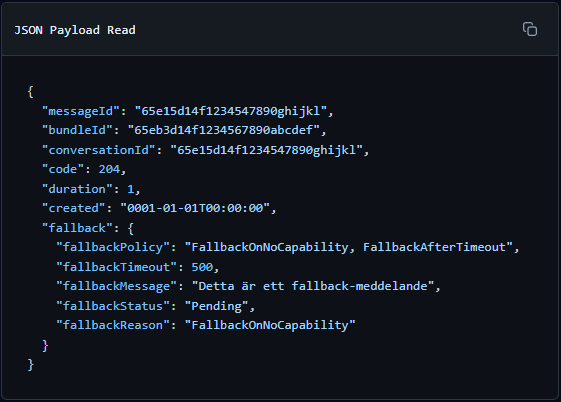
When the customer opens the message, a payload with the READ status is sent.
Read receipt payload
{
  "messageId": "65e15d14f1234547890ghijkl",
  "bundleId": "65eb3d14f1234567890abcdef",
  "conversationId": "65e15d14f1234547890ghijkl",
  "code": 204,
  "duration": 1,
  "created": "0001-01-01T00:00:00",
  "fallback": {
    "fallbackPolicy": "FallbackOnNoCapability, FallbackAfterTimeout",
    "fallbackTimeout": 500,
    "fallbackMessage": "This is a fallback message",
    "fallbackStatus": "Pending",
    "fallbackReason": "FallbackOnNoCapability"
  }
}
Code example: Receive a webhook
Receiving these asynchronous events is straightforward. The following example shows how to build a typical C# webhook controller that receives, parses, and logs these valuable KPIs.
using Microsoft.AspNetCore.Mvc;
using System;

[ApiController]
[Route("api/rcs/webhooks")]
public class RcsWebhookController : ControllerBase
{
    private readonly ILogger<RcsWebhookController> _logger;

    public RcsWebhookController(ILogger<RcsWebhookController> logger)
    {
        _logger = logger;
    }

    [HttpPost("events")]
    public IActionResult ReceiveReadCallback([FromBody] RcsReadCallbackPayload payload)
    {
        // Check whether the status code means Read (code 204)
        if (payload.Code == 204)
        {
            _logger.LogInformation("Message {MessageId} in conversation {ConversationId} was marked as READ.",
                payload.MessageId, payload.ConversationId);

            // TODO: Update the message status and read metrics (KPIs) in your database
        }

        // IMPORTANT: Always return HTTP 200 OK promptly to avoid retries
        return Ok();
    }
}

// DTO classes for the RCS API read receipt payload
public class RcsReadCallbackPayload
{
    public string MessageId { get; set; }
    public string BundleId { get; set; }
    public string ConversationId { get; set; }
    public int Code { get; set; }
    public int Duration { get; set; }
    public DateTime Created { get; set; }
    public FallbackDetails Fallback { get; set; }
}

public class FallbackDetails
{
    public string FallbackPolicy { get; set; }
    public int FallbackTimeout { get; set; }
    public string FallbackMessage { get; set; }
    public string FallbackStatus { get; set; }
    public string FallbackReason { get; set; }
}
Three best practices for handling webhooks
Respond immediately (HTTP 200 OK): Your endpoint should return "OK" immediately. Avoid making expensive database calls synchronously within the same request. If a database update takes too long, our system may treat the delivery as failed and resend the webhook. Queue resource-intensive work as a background job instead.
Use idempotent processing: Networks are unpredictable, and the same event can occasionally be triggered twice. Use the unique eventId included in the payload to ensure that you do not record the same read receipt more than once.
Connect IT and marketing: Do not leave this data in server logs. Feed read rates directly into your CRM systems or marketing dashboards so your organization can take full advantage of these additional insights.
Summary
By introducing real-time events, RCS removes the uncertainty about what happens after a message leaves the server. Knowing whether a customer actually read an offer—or seeing in real time when they are composing a question for customer service—moves the entire B2C dialogue from static broadcasts to genuine conversations.
With a correctly integrated webhook for read events, you gain control of your data and maximize the potential of next-generation mobile communication.