
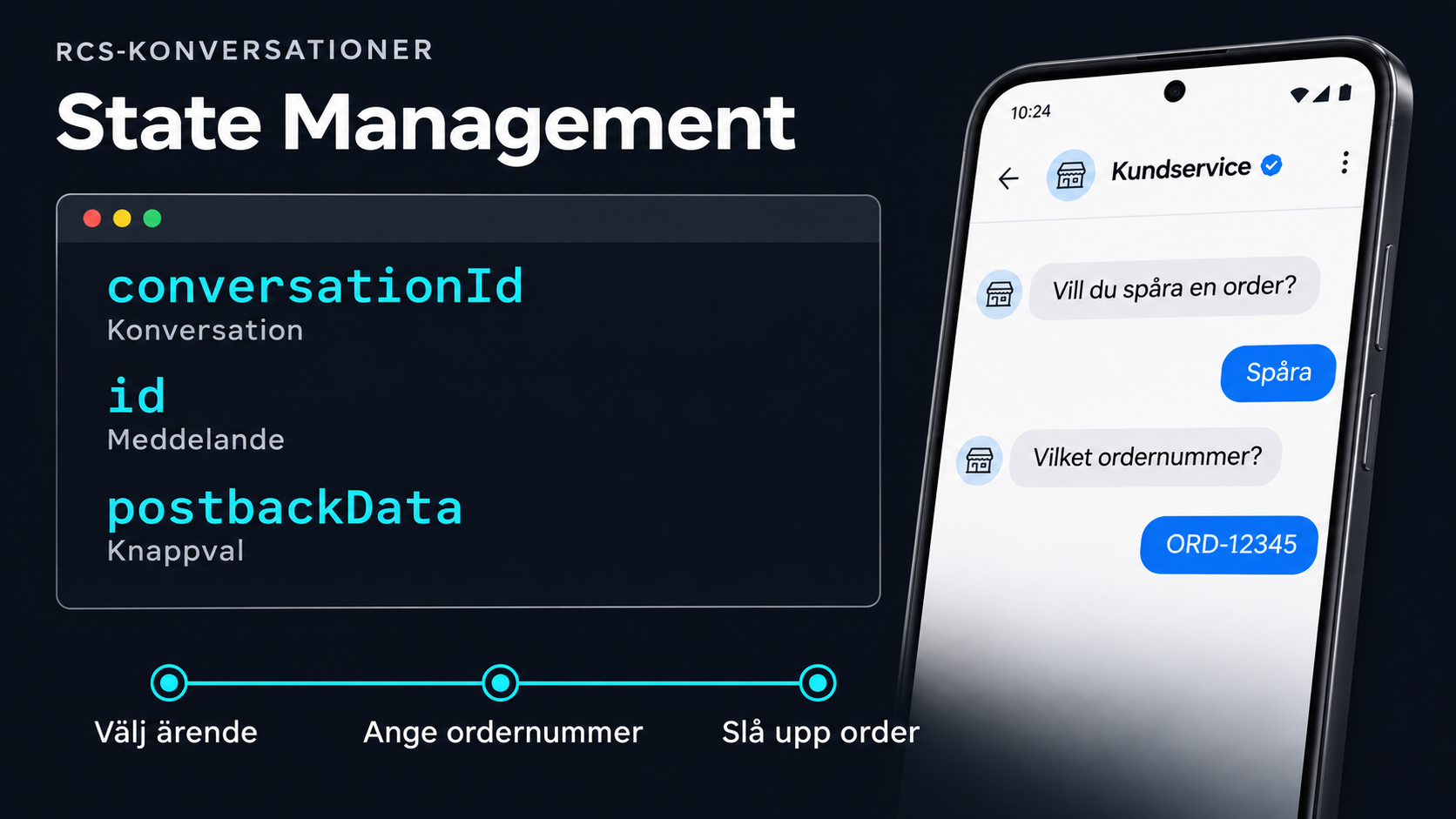
In earlier articles, we explored rich cards, interactive buttons and delivery tracking. Now it is time to connect those pieces into a chatbot that remembers where the user is in the conversation.
When a customer replies “Yes”, what does that mean? Should the bot confirm a booking, retrieve order status or connect customer service?
The answer lies in conversation state. Clear State Management lets your RCS chatbot identify the current step, the message being processed and the actions allowed next.
How do you build an RCS chatbot?
Start with one task, such as tracking an order. Create a developer account, prepare your brand and agent and send your first test message. Once the basic flow works, connect incoming messages and button interactions to your application’s conversation steps.
Start with the RCS API quickstart. Then use the order flow below to keep track of customer replies.
Which fields connect an RCS conversation?
conversationIdon a message connects it to its conversation.ididentifies the resource. On anRcsMessageit identifies the message; aConversationhas its ownid.postbackDataon aSuggestionidentifies the action represented by a button.uniqueIdis available onConversationRequestas a reference when creating a conversation.
Your application stores the dialogue step, such as WAITING_FOR_ORDER_NUMBER.
The conversation ID connects the dialogue. The message ID helps recognize a message already processed. Your application state determines the next step.
Start a conversation, then continue in the same one
Send the first message to:
POST https://api.ip1.net/v3/conversationsThe request can include a suggested reply. The Swedish text below matches the order-tracking example used throughout this guide:
{
  "brand": "YOUR_BRAND",
  "agent": "YOUR_AGENT",
  "recipient": "46700123456",
  "uniqueId": "support-order-12345-start",
  "type": "Text",
  "content": "Hej! Vill du spåra en order? Svara SPÅRA.",
  "suggestions": [
    {
      "text": "Spåra",
      "type": "SuggestedReply",
      "postbackData": "track_order"
    }
  ]
}
A successful request returns an RcsMessage. Save both its id and conversationId.
Send the next question within the existing conversation:
POST https://api.ip1.net/v3/conversations/{conversation}The {conversation} parameter is the conversation ID. The body follows MessageRequest:
{
  "type": "Text",
  "content": "Vilket ordernummer vill du spåra?"
}
Pro tip: Create a conversation to start a new flow. Use the existing conversation endpoint to continue the current dialogue.
Read the single-recipient conversation documentation.
Build a small state machine
An order-tracking bot can start with three steps:
WAITING_FOR_CHOICE: wait for the user to choose order tracking.WAITING_FOR_ORDER_NUMBER: wait for an order number.READY_FOR_ORDER_LOOKUP: the application has enough information to proceed to an order lookup.
The same text can have different meanings at different steps. An order number arriving at the wrong step should not automatically trigger a lookup.
Keep dialogue state separate from message delivery status. Delivery confirms that a message arrived, not that the user answered the question.
Code example: process an incoming message once
This example uses conversationId, id, direction and content from RcsMessage. It handles the Swedish text reply “SPÅRA” followed by an order number. MO identifies an incoming user message; outgoing MT messages do not advance this function's dialogue state.
// Tillståndslogik för RcsMessage enligt iP.1:s API-specifikation.
// Demo i en process. Beständig lagring och transaktioner behövs i produktion.
const conversations = new Map();

function stableId(value) {
  if (typeof value === 'string' && value.trim()) return JSON.stringify(value);
  if (value && typeof value === 'object' && !Array.isArray(value)) {
    const keys = Object.keys(value).sort();
    if (keys.length) return JSON.stringify(value, keys);
  }
  throw new Error('Ett fullständigt ID från API-svaret krävs.');
}

function startState(conversationId, now = Date.now()) {
  const key = stableId(conversationId);
  const existing = conversations.get(key);
  if (existing && existing.expiresAt > now) {
    throw new Error('Konversationen har redan ett aktivt tillstånd.');
  }
  conversations.set(key, {
    step: 'WAITING_FOR_CHOICE',
    processed: new Set(),
    expiresAt: now + 30 * 60 * 1000,
  });
}

function handleMessage(message, now = Date.now()) {
  if (message.direction !== 'MO') return { status: 'ignored' };
  const state = conversations.get(stableId(message.conversationId));
  if (!state || state.expiresAt <= now) return { status: 'expired' };
  const id = stableId(message.id);
  if (state.processed.has(id)) return { status: 'duplicate' };

  const text = typeof message.content === 'string' ? message.content.trim() : '';
  const normalized = text.toLocaleUpperCase('sv-SE');
  let reply;

  if (state.step === 'WAITING_FOR_CHOICE' && normalized === 'SPÅRA') {
    state.step = 'WAITING_FOR_ORDER_NUMBER';
    reply = 'Vilket ordernummer vill du spåra? Skriv till exempel ORD-12345.';
  } else if (
    state.step === 'WAITING_FOR_ORDER_NUMBER' &&
    /^ORD-[0-9]{4,10}$/.test(normalized)
  ) {
    state.step = 'READY_FOR_ORDER_LOOKUP';
    state.orderNumber = normalized;
    reply = 'Tack! Jag tar frågan vidare för orderuppslagning.';
  } else {
    return { status: 'unexpected_input', step: state.step };
  }

  state.processed.add(id);
  return { status: 'accepted', step: state.step, reply };
}
After creating the conversation, call startState with the conversationId from the API response. Pass incoming messages to handleMessage. When the result is accepted, the application can schedule the reply in the same conversation.
ID formats: The specification describes ID fields as ObjectId. The helper builds a local comparison key from the complete value. This key is for local storage. Use the API's expected ID format in endpoint paths, and never derive a message ID from a timestamp alone.
How does postbackData connect to chatbot state?
The button text helps the user choose. postbackData helps your application identify the choice:
{
  "text": "Spåra",
  "type": "SuggestedReply",
  "postbackData": "track_order"
}
Once your callback handler has received and verified a button interaction, it can connect that action to the appropriate state transition. Keep action codes stable and check that the action is allowed at the current step. A button from an earlier part of the conversation should not confirm a new case by mistake.
The code example processes text messages. Connect button interactions to the same business logic through your callback handler using the callback format configured for your integration.
See PostBackData and button interactions.
Two different protections against duplicates
Duplicates can arise when sending API requests and when processing incoming information. uniqueId is available on ConversationRequest; the API documents HTTP 409 for a duplicate or UniqueId. Store your reference before sending and investigate the result if a retry returns a conflict.
For incoming messages, use the message's id. The example's processed set prevents a message already handled from advancing the state twice.
uniqueId belongs to conversation creation. It is not present on MessageRequest in the current specification and should not be added when continuing a conversation.
From a demo to a production chatbot
The example uses an in-memory Map, which is cleared when the process restarts. For production, store state in a database and address:
- Durable storage: persist dialogue steps and processed message IDs.
- Coordinated processing: process changes in each conversation in order and protect against concurrent updates.
- Transactions and an outbox: store the state transition together with the planned reply so a separate sender can resume after an interruption.
- Expiry: define when a flow expires and how users can restart. The example's 30-minute limit is an application choice.
- Customer isolation: include the correct account, brand or agent context in storage keys and authorization checks.
Before revealing order information, check that the user is authorized to access that order. A correctly formatted order number is only the first step.
Follow both dialogue and delivery
Retrieve conversation messages using:
GET https://api.ip1.net/v3/conversations/{conversation}/messagesRetrieve an individual message using:
GET https://api.ip1.net/v3/conversations/{conversation}/messages/{id}Connect the conversation, the message and its statuses. Use dialogue state to determine the next question and message status to track delivery.
This gives your RCS chatbot a clear foundation: the right conversation, the right message and the right next step.
Start with a small flow, test duplicate and unexpected replies, then expand with Suggested Actions and Replies.